

Finding a decent laser engraving machine in the UK without getting ripped off is harder than it sounds. Prices swing wildly from £300 to £5,000+, the specifications read like alphabet soup, and what seems like a bargain on Amazon often turns into a money pit once you factor in all the bits they conveniently forgot to mention in the listing.
I spent weeks digging through UK supplier catalogues, forum threads, and actual user experiences to put together something useful here. Whether you’re after a hobby machine for weekend projects or something that’ll actually pay for itself through an Etsy shop, the goal is simple: spend your money where it matters and avoid the classic mistakes that catch people out.
Why the Sticker Price Tells You Almost Nothing
Here’s something that trips up nearly everyone. You find a diode laser on sale for £280, think you’ve found a steal, and three weeks later you’ve spent another £400 on an air assist pump, fume extractor, and rotary attachment that the listing conveniently described as “optional accessories.”
A mate of mine bought a cheap K40 clone last year for £350. Seemed brilliant until the tube died after 800 hours (they’re rated for 2,000 minimum), the replacement cost £250, and he discovered the hard way that the cooling system was basically a fish tank pump that couldn’t keep up during summer. By the time he’d sorted proper cooling and replaced the tube twice, he’d spent more than a quality OMTech’s unit would have cost from the start.
The real cost of any laser machine breaks down into three buckets: the machine itself, the accessories you’ll definitely need, and the running costs that add up quietly over months and years.
What You’re Actually Buying: Machine Types and UK Prices
Before throwing money at anything, you need to understand that not all lasers work on all materials, and buying the wrong type means either upgrading sooner than planned or bodging workarounds that waste time and produce mediocre results.
Diode Lasers (£300 – £2,100)
These use blue light technology and they’re what most hobbyists start with because they’re relatively affordable and don’t need water cooling or complex ventilation setups. The catch is they cannot cut clear acrylic at all (the beam passes straight through) and they won’t mark bare metal without special sprays that cost a fortune and add faff to every job.
What they do brilliantly is engrave wood, leather, slate, and dark-coloured plastics. The burn marks on timber come out properly dark and detailed, which makes them excellent for photo engraving if you’ve got the patience to dial in the settings.
Current UK pricing for machines worth considering:
- The Sculpfun S30 Pro runs about £300-£450 for 10W and represents genuinely good value because it includes automatic air assist, which most competitors charge £80-£150 extra for. The S30 Ultra at £650-£850 bumps you up to 22W or 33W with a larger 600x600mm working area.
- xTool’s D1 Pro sits at £500-£900 depending on whether you go 10W or 20W. The build quality is noticeably better than budget options and their software ecosystem is less painful for beginners, though you’re paying a premium for that polish.
- The Creality Falcon2 at around £700-£1,100 for the 22W or 40W versions punches above its weight on raw power, and I’ve seen the 40W version cut through 20mm pine in a single pass, which is impressive for a diode.
For anyone wanting an enclosed system that won’t require safety goggles and won’t have the cat walking through the beam, the xTool S1 at £1,699-£2,100 is the current favourite. It’s Class 1 safety rated, meaning you can run it in a family home without worrying about eye damage or pets.
CO₂ Lasers (£500 – £5,500+)
Now, when we get to this stage, things begin to get really serious for anyone who is planning to sell in practice. CO₂ Lasers operate on a completely different wavelength (10,000,6mmnm) acrylics absorb perfectly, giving you the clean flame-polished edges buyers expect on cake toppers or wedding signs. They ‘re faster than diodes, can cut thicker materials and handle a much wider range of substrates.
The penalty, however, is complexity: You need water cooling (either a bucket and pump arrangement or a proper chiller unit), ventilation to deal with the fumes, and more space because even “desktop” CO₂ machines are chunky.
The OMTech K40+ for £500-£650 is the new version of the classic K40 that has been the starting point for thousands of small businesses. It ‘s a 40W machine with a modest 300x200mm bed, ideal for producing less but properly cutting clear acrylic than most premium diode lasers–and pleasingly affordable!
The OMTech Polar for £2,400-£2,800 is worth considering if you ‘ve been eyeing up a Glowforge but don’t fancy the cloud software subscription model. It has a 50W machine with a 510x300mm bed and uses industry-standard LightBurn software, so in fact you own your way of working rather than rent it.
xTool’s P2 at £4,300-£4,600 has basically taken over the “serious Etsy seller” market. The 55W CO₂ laser comes with dual cameras for positioning (you literally drag your design onto a photo of your material on screen), passthrough slots for longer pieces, and curved surface engraving that most competitors can’t touch. It’s not cheap, but it’s the machine I’d point anyone towards if their business depends on quick turnaround and professional results.
For proper workshop use, OMTech’s MF/AF series at £2,300-£3,500 gives you 60W-100W power with massive beds (500x700mm up to 600x900mm) that can handle full sheets of material. These are heavy units (100kg+) that need dedicated space and a proper chiller, but the price-per-watt is unbeatable.
If your livelihood depends on the machine running without drama, HPC Laser’s LS6090 PRO at around £5,350+VAT is the UK-supported option that businesses swear by. HPC is based in Halifax and provides actual onsite engineers, training, and warranties that mean something. You’re paying for peace of mind and UK-based support that picks up the phone.
Fibre Lasers (£1,300 – £5,750+)
Fibre lasers are a completely different animal designed specifically for marking metals. They use galvo mirrors that vibrate at ridiculous speeds (up to 7,000mm/s) to permanently mark serial numbers, logos, and patterns onto steel, aluminium, brass, and precious metals.
You cannot use a diode or CO₂ laser on bare metal without marking sprays that add cost and hassle to every job. If metal engraving is your business, fibre is the only serious option.
OMTech’s FM series at £2,100-£2,600 for 30W-50W Raycus source is the workhorse that most UK jewellers and industrial markers start with. The 30W version handles deep engraving on stainless steel beautifully, while 50W is what you need if you’re cutting thin metal sheets for jewellery blanks.
The xTool F1 Ultra at £3,300-£3,600 does something clever by combining a 20W fibre laser with a 20W diode in the same portable unit. You can engrave metal tumblers and wooden keychains at the same craft fair without swapping machines, which is genuinely useful for mobile sellers.
For colour marking on stainless steel (blues, reds, oranges through oxide layers), MOPA technology in machines like the OMTech MOPA series at £3,000-£4,500 lets you tune pulse duration to create effects that standard fibre sources cannot achieve.
Matching Machines to How You’ll Actually Use Them
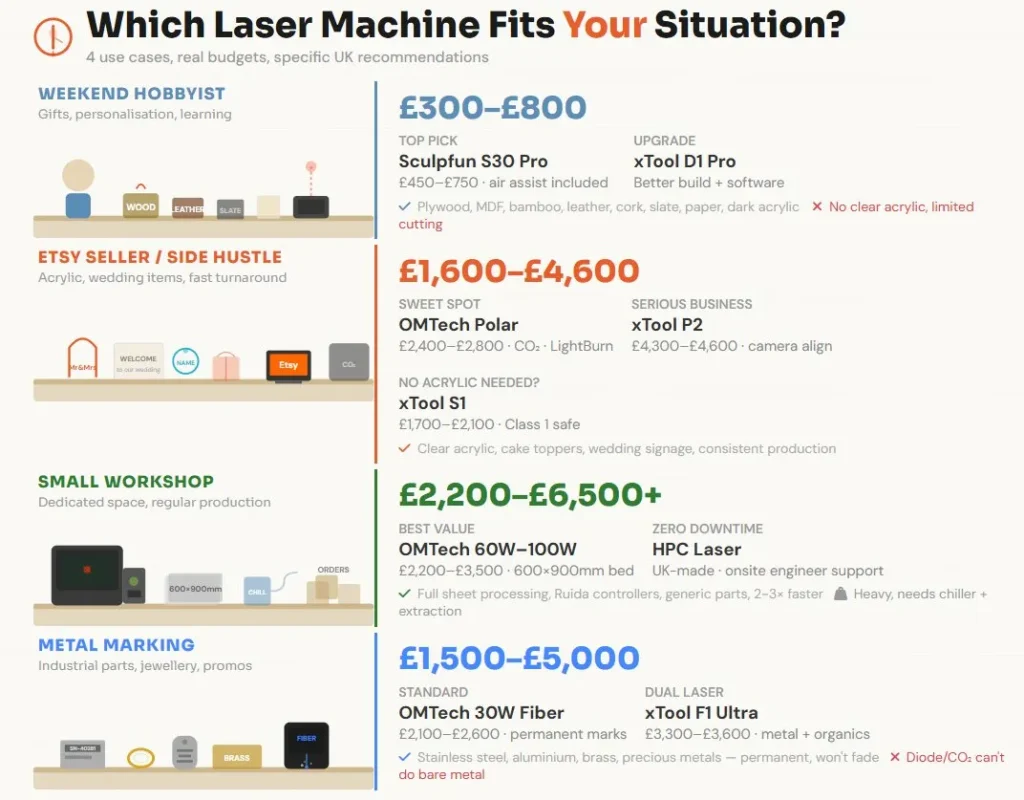
Reading specifications is one thing, but what actually matters is whether the machine fits your situation and budget. Here’s how the numbers break down for different use cases in the UK market right now.
The Weekend Hobbyist (Budget: £300-£800)
You don’t need to lay out big money. If you’re just making thoughtful gifts for distant family, DIY knick-knacks around the house, and especially learning about other things that are practicable in what you do, then amounts do not match up with results. A diode laser in this bracket will handle timber, leather, slate coasters, and card stock without a murmur of protest.
I would suggest the Sculpfun S30 Pro in this price range for most people at £450-£750. It comes with its own air assist which is already a saving of £80-£150 and means the charring you get on cheap laser jobs looks rubbish. One of these makes all the difference in print quality if you can afford to have two lasers working side by together at once instead exclusively using your one machine. The xTool D1 Pro at the upper end of this price band offers better build quality and software which doesn’t constantly have you feeling like throwing that expensive laptop right out through an open window.
You’re safe here as long as you stick to the following materials: plywood, MDF, hardwood, bamboo, leather, cork, slate, paper, cardboard, and dark acrylics. Anything thick is out of the immediate picture; clear acrylicity does not make good sense at all.
The Etsy Seller or Side Hustle (Budget: £1,600-£4,600)
Once you’re selling products, everything changes. Customers expect clean cuts on acrylic, fast turnaround, and consistent quality. A diode laser will hold you back because clear and coloured acrylics are massively popular for personalised gifts, cake toppers, and wedding items.
The OMTech Polar at £2,400-£2,800 is the sweet spot for people who want CO₂ capability without spending four grand. It cuts clear acrylic beautifully, uses LightBurn software that you actually own, and fits in a spare room or garage without taking over completely.
If budget allows, the xTool P2 at £4,300-£4,600 has become the default recommendation for anyone serious about an Etsy business. The camera positioning system alone saves hours of alignment fiddling, and the curved surface engraving opens up product lines that flat-bed machines can’t touch.
For sellers who don’t need clear acrylic (maybe you’re focused on wooden signs and leather goods), the enclosed xTool S1 at £1,700-£2,100 gives you Class 1 safety and enough power to run a proper business without CO₂ complexity.
The Small Workshop (Budget: £2,200-£6,500+)
When you have a set program and enough room, table-top machines are just too slow. Industrial cabinet CO₂ lasers provide nearly 3x the working area of each other for similar price points and have Ruida controllers which are standardised. This makes it very easy to find spare parts because the laser runs just like an ordinary machine, even though it may take diving at a few smaller joints fingers first.
OMTech’s £2,650-£4,700 cabinets are the best there is on value. The 600x900mm workbeds mean that full sheet materials can be processed efficiently and 90W+ versions save an awful lot of time with thicker blanks. It’s just that these machines are really heavy and take up a lot of space: at any average-sized facility producing regular orders for clients, eventually sooner rather than later he’ll have to get back his investment in time and labor productivity gains.
For businesses where downtime equals real losses, systems provided in this country with service cultivated on-the spot by HPC Laser pay off. An engineer who can come in person at any hour of the day or night when your tube fails on Tuesday morning and orders must be in by Thursday can make all the difference.
Metal Marking Operations (Budget: £1,500-£5,000)
Industrial part marking, jewellery engraving, and promotional metal items all require fibre lasers. There’s no workaround here—diode and CO₂ simply won’t permanently mark bare metal.
The OMTech 30W Fiber at £2,100-£2,600 is the standard starting point for UK businesses. It marks stainless steel, aluminium, brass, and precious metals with permanent, high-contrast results that won’t fade or wear off.
For mixed operations where you need both metal and organic materials, the xTool F1 Ultra’s dual-laser setup at £3,300-£3,600 eliminates the need for two separate machines.
The Hidden Costs Nobody Mentions in the Listing
This is where cheap machines become expensive machines. Nearly every entry-level and mid-range laser ships as a “standalone” unit that requires additional purchases to actually work properly or safely.
Accessories You’ll Definitely Need
- Air assist pumps (£50-£150): Blows air across the cutting point to prevent charring on wood and protects your lens from smoke damage. Some machines include this, many don’t. Check before buying because retrofitting costs more than factory-fitted.
- Fume extraction (£300-£1,500+): If you can’t vent smoke directly out a window, you need a filtration unit. The xTool Smoke Purifier and BOFA units work but the replacement filters at £50-£150 every 3-6 months add up quietly. I know someone who spent more on filters in two years than the extractor cost originally.
- Rotary attachments (£100-£450): Essential for engraving tumblers, wine glasses, rolling pins, or anything cylindrical. Not included with most machines.
- Water chillers (£150-£500): CO₂ lasers need cooling. Cheap machines come with a bucket and aquarium pump that works until summer temperatures push the water above safe operating range. A proper refrigerated chiller like the S&A CW-5200 costs more but protects your tube investment.
Consumables and Replacement Parts
- CO₂ laser tubes (£200-£1,000): Think of these like very expensive lightbulbs with 2,000-10,000 hour lifespans depending on quality. A 40W tube runs about £250 to replace, while 100W tubes can exceed £800. Budget for at least one replacement over the machine’s working life.
- Lenses and mirrors (£40-£150 per set): These need daily cleaning and eventually scratch or pit regardless of care. A quality ZnSe lens is £50-£90, and you’ll want spares on hand.
- Honeycomb beds (£60-£150): The support surface gets gunked up with resin over time. Some people clean them endlessly, others just replace them yearly.
Running Costs
UK electricity currently sits around 25-30p per kWh, which means:
Diode lasers draw almost nothing (0.05-0.1 kWh), costing less than 3p per hour to run. CO₂ lasers including the chiller and extractor pull 0.8-1.2 kW, working out to 24-36p per hour. Industrial fibre systems draw 0.5-1.5 kW on standby and cooling, roughly 15-45p per hour depending on usage patterns.
Software is another consideration. LightBurn is the industry standard for nearly everything except Glowforge machines. A diode licence costs about £48 one-time, while CO₂/DSP licences run £95 one-time. If you’re using Illustrator or other Adobe tools for design work, that’s another £20-£50 monthly.
Import Duties and VAT
Buying direct from China seems cheaper until the courier invoice arrives. For machines shipped from outside the UK:
VAT at 20% applies to the total value including shipping. If the listing doesn’t say “VAT included” or “ships from UK warehouse,” budget for this surprise.
Customs duty for laser machinery (HS Code 845611) is currently 0-4%, but couriers charge £15-50 admin fees just for processing the paperwork.
The £135 rule means anything over £135 (basically all lasers) has VAT collected at the border rather than point of sale.
Always check for UK warehouse stock. The price difference often disappears once you factor in duties, and you avoid weeks of customs delays.
Three Cautionary Tales Worth Learning From

These aren’t specific individuals obviously, but they represent patterns I’ve seen repeatedly in forums, Facebook groups, and conversations with UK laser users. The mistakes are real even if the names aren’t.
Sarah’s Expensive Education in “Saving Money”
Sarah was after a laser for craft projects, and perhaps selling some bits to cover costs on Facebook Marketplace. She ordered an open-frame diode laser for £280 on Amazon, and said she would upgrade later if things took off.
Within the first month she had spent another £95 on an air assist pump because everything that emerged, blackened and smoky. Then £180 on a basic fume extractor as the spare bedroom with a window open was not really doing it. Then £120 on a rotary attachment because someone asked for engraved wine glasses.
The machine itself was not happy out of the box with anything thicker than 3mm plywood and the laser module began losing power after about 8 months. But once she deployed the tool for proper enclosed operation with an xTool S1, she found that as good as £900 worth of investment into cheap machine plus accessories — and most of that didn’t even work on her new setup.
Total wasted: approximately £700 in false economy
The lesson isn’t that cheap machines are always bad—the Sculpfun S30 Pro at similar money would have included air assist and handled her needs fine. The lesson is that “£280” was never the real price, and a more considered purchase at £500-700 would have cost less overall while producing better results from day one.
Marcus and the CO₂ Learning Curve
Marcus operates a small signwriting firm and did his research before purchasing an OMTech 60W cabinet laser (£circa-£2,400). Good choice with what he said he wants – big bed, power to do acrylic and use industry standard tech.
Where he went wrong was in underestimating setup and running costs. The machine shipped with a rudimentary water cooling bucket which was adequate until July when the ambient temp nudged up well over 25°C and the tube played up. He wasted a weekend of production time before learning that was the (very expensive) issue, and so he spent £380 on a real CW-5200 chiller.
Then tube died around 2,800 hours later — within spec, but earlier than expected — and needed a £450 replacement. His first extraction arrangement (dryer hose out of the garage door) would not cut it when he investigated business insurance, so another £600 went on decent ducting and a fire-rated fan.
After 18 months, his actual investment looked like: machine £2,400 + chiller £380 + tube £450 + extraction £600 + LightBurn licence £95 + various consumables £200 = roughly £4,125.
The machine paid for itself within ten months through saved outsourcing costs and new product lines. But Marcus wishes someone had told him to budget £4,500-5,000 from the start rather than £2,400, because cash flow juggling those “surprise” expenses was stressful for a small operation.
Jenny’s Workshop Scaling Decision
At home,Jenny ran a successful Etsy shop selling wooden signs, acrylic keyrings and leather goods using an xTool P2. Business eventually grew and she moved her operation to a small industrial unit. She now had two options: buy another P2 at 4,300 pounds, or invest in a larger industrial space.
In the end she chose an OMTech 80W cabinet at around 3,000 pounds, which seemed counter-intuitive since it was ‘worse’ in some ways on paper (no camera alignment basic software and less polished user experience). But the 600x900mm bed meant she could process four times the material per job, and the 80W cut her acrylic work in half the time.
Ruida controllers aren’t as user-friendly as XTool’s software, so it took about three weeks to educate * (initially posting on the UK laser community Facebook group with help from others who had been through that learning curve themselves)*. Also it’s loud and needs proper extraction but that was fine in the industrial unit and would have been unthinkable at home.
After one year: the OMTech handles all her volume work while the P2 does detailed positioning work and prototypes. Combined output is roughly 3x what she managed with the P2 alone, and she’s consistently profitable enough to hire part-time help for packing and shipping.
Her advice: “Don’t outgrow your machine twice. If you’re serious enough to rent workspace, spend the money on equipment that won’t bottleneck you in six months.”
Material Compatibility: What Actually Works With What
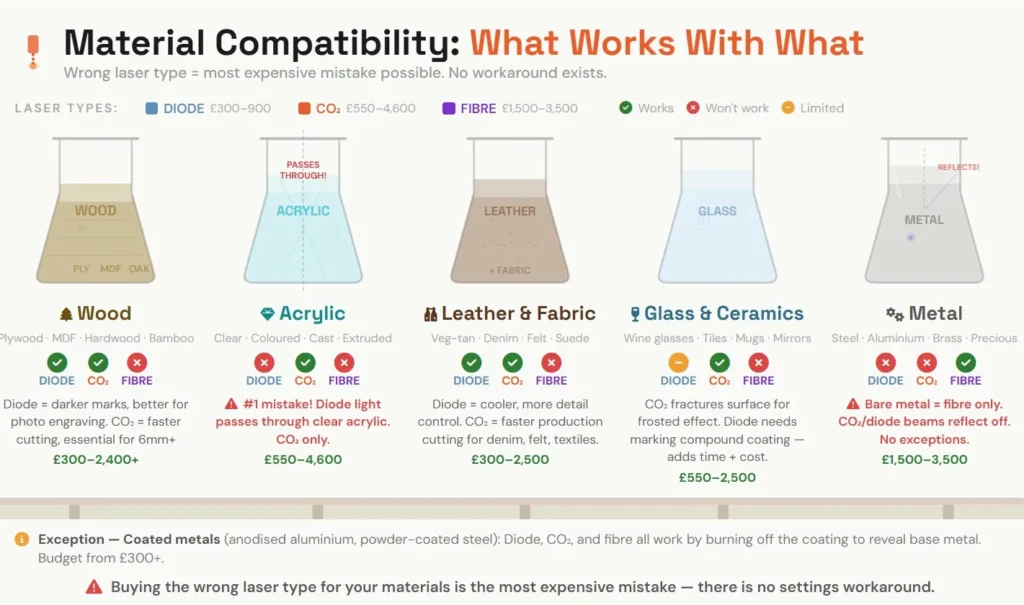
Buying the wrong laser type for your intended materials is probably the most expensive mistake possible because there’s no workaround—you simply cannot make a diode laser cut clear acrylic no matter how you adjust the settings.
Wood (Plywood, MDF, Hardwood, Bamboo)
Works with: Diode or CO₂
Diodes produce darker, more carbonised marks that actually look better for photo engraving on timber. CO₂ is significantly faster for cutting, especially anything over 6mm thick.
For hobby use on thin materials (3-6mm), a 10W+ diode at £300-600 handles engraving and light cutting fine. For production cutting of 6-12mm plywood, you want 40W+ CO₂, which means £550 minimum for a K40+ or £2,400+ for something with a proper bed size.
Acrylic and Plastics
Works with: CO₂ only (for clear/transparent colours)
This catches more people out than anything else. The blue light from diode lasers passes straight through clear, white, and light-coloured acrylics. If you’re planning to sell acrylic products—cake toppers, keyrings, signs, earrings—you need CO₂.
Budget £550 (OMTech K40+) to £4,600 (xTool P2) depending on bed size and features. The flame-polished edges that CO₂ produces on acrylic are the industry standard; anything less looks amateur to buyers who’ve seen quality work.
Leather and Fabric
Works with: Diode or CO₂
Both work well, with different strengths. Diode lasers run “cooler” and give you more control for detailed leather engraving without excessive burning. CO₂ is faster for production fabric cutting—think denim patches, felt decorations, or textile patterns.
Budget £300-900 for diode work, £500-2,500 for CO₂ depending on speed requirements.
Glass and Ceramics
Works with: CO₂ (or diode with marking compounds)
CO₂ lasers fracture the glass surface to create a frosted effect. You can achieve similar results with diode lasers by first coating the glass with black tempera paint or marking sprays, but this adds time and consumable costs.
Budget £550-2,500 for proper glass work without workarounds.
Metals
Bare metal (stainless steel, aluminium, brass): Fibre laser only. No exceptions. CO₂ and diode beams reflect off bare metal surfaces.
Coated metal (anodised aluminium, powder-coated steel): Diode, CO₂, or fibre all work by burning off the coating to reveal the base metal.
For serious metal marking, budget £1,500-3,500 for a fibre galvo system. The OMTech 30W Fiber at £2,100-2,600 is the standard workhorse for UK jewellers and industrial markers.
Timing Your Purchase
Prices fluctuate throughout the year, and patience can save meaningful money on larger purchases.
Black Friday through Christmas typically brings the best deals, with 15-25% discounts common across major brands. xTool and Creality are particularly aggressive during this period.
New model launches push older versions into clearance. The xTool P2’s release dropped P1 prices significantly, and similar patterns repeat across the industry.
End of financial year (March in the UK) sometimes brings business seller discounts as distributors clear stock.
Bundle deals often provide better value than headline discounts. A machine with included rotary attachment and air assist at full price may cost less than a “20% off” machine plus separately purchased accessories.
What to avoid: “refurbished” machines without proper warranty, clearance models where replacement parts are already discontinued, and any deal that seems dramatically below market rate from unfamiliar sellers.
The Bottom Line on Value
The best laser engraving machine deal isn’t the cheapest listing price. It’s the total cost of ownership divided by the productive output you get from it.
A £2,400 OMTech that runs reliably for five years with £800 in tubes and consumables costs you £640 per year. A £400 machine that needs £600 in accessories, dies at 18 months, and gets replaced works out more expensive while producing worse results and more frustration.
Buy for where you’ll be in two years, not where you are today. Factor in the hidden costs before committing. Choose UK suppliers with actual support for anything business-critical. And remember that the people selling cheap machines aren’t the ones staying up until 2am trying to finish customer orders on equipment that keeps playing up.
The UK market right now offers genuinely good options at every price point. The Sculpfun S30 series for hobbyists who want honest value. OMTech’s range from K40+ through to industrial cabinets for businesses at different scales. xTool’s polished, user-friendly systems for people who’ll pay extra for a smoother experience. HPC’s UK-supported professional equipment for operations that can’t afford downtime.
Work out what you actually need, budget for the real total cost, and buy something that won’t make you wish you’d spent more in six months’ time.


