

Minecraft can be generous with players’ patience, right up until the world feels shaky. Lag during travel, surprise disconnects, and rollback anxiety drain the fun fast. That’s why reliable minecraft server infrastructure matters for any group world that wants to last.
But here’s the question that actually divides friend groups: do you use the Mac sitting on your desk, or do you pay someone else to host?
Both options work. Neither is free — not really. The Mac you already own still costs money to run, and the “cheap” VPS tier might save you more than you’d think once you factor in electricity, wear, and the hours you’ll spend fixing things at midnight.
Let me walk through what each option actually costs, because the answer isn’t as obvious as it looks.
The Mac reality check that saves everyone time
Before we talk money, let’s settle the compatibility question. Someone always asks whether Minecraft runs on Mac, and the short answer is yes — but the longer answer depends on which Mac.
Minecraft Help’s System Requirements for Java Edition states you need macOS 10.15 or later for online play and updates. That one line ends a lot of group chat confusion. If someone’s running an older MacBook from 2015, they’re not joining your server without upgrading something.
When the “can I run it” question comes up, two follow-ups sort most problems: “Which Mac model?” and “How much RAM?” Those answers explain performance issues faster than any troubleshooting guide.
Since Minecraft 1.19, Java runs natively on Apple Silicon. M1, M2, M4 — they all handle the game well. The question is whether they handle hosting well, and for how long, and at what cost.
What running your Mac as a server actually costs
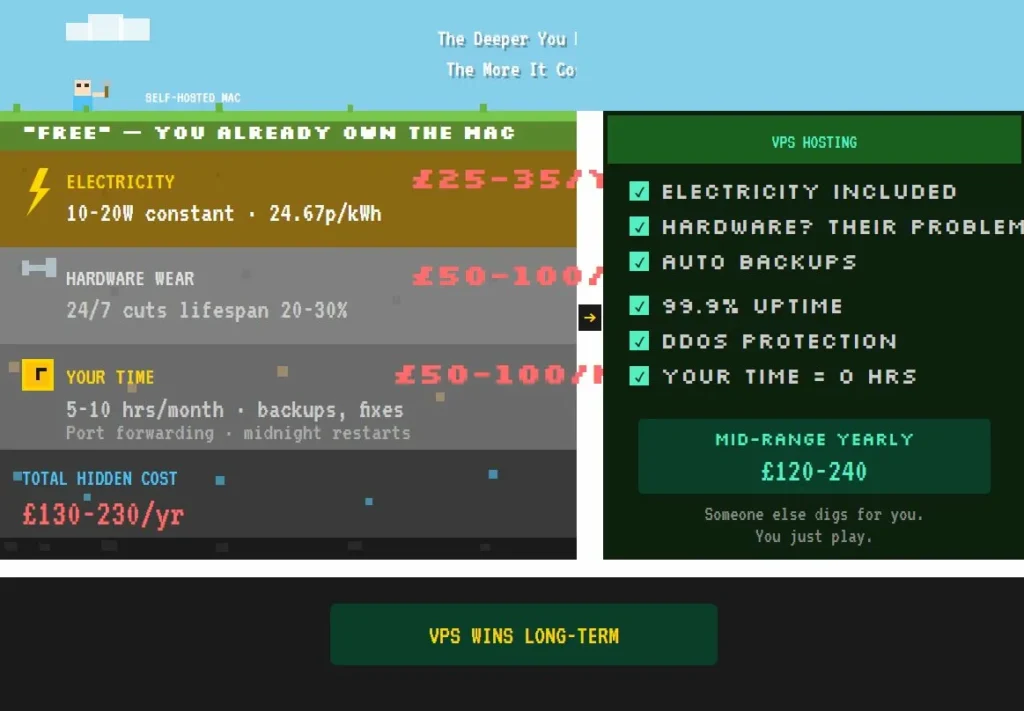
The upfront cost looks brilliant: zero quid. You already own the hardware. Plug it in, install the server files, forward some ports, done.
Except it’s not done. Here’s what actually adds up.
Electricity — A Mac Mini M1 running as a Minecraft server draws about 10-20 watts on average. Light load, spikes during busy sessions. Based on Ofgem’s April-June 2026 price cap at 24.67p per kWh, running that Mini around the clock costs roughly £25-35 per year. Not catastrophic, but not nothing either.
Hardware wear — Macs aren’t designed for 24/7 server duty. Running one constantly shaves 20-30% off its useful lifespan. A Mini that might last 5-7 years as a desktop becomes a 3-5 year machine as a server. On a £500-800 Mac Mini, that’s £50-100 per year in depreciation you’re not seeing on any bill but definitely paying.
Your time — This one gets ignored until it bites you. Setup, backups, restarts, troubleshooting when someone can’t connect, port forwarding headaches, dynamic IP drama. Call it 5-10 hours per month if you’re being honest. Value your time at even £10 an hour and that’s £50-100 monthly in labour you’re donating to the cause.
Add it up and year one running a Mac server costs somewhere between £130 and £230. Year two looks similar, minus the setup time, plus whatever breaks.
As Benjamin Franklin put it, “An ounce of prevention is worth a pound of cure.” That applies to backups, but it also applies to asking whether the cure you’ve chosen is actually the cheapest one.
When your Mac starts to struggle
Performance depends on what you’re asking it to do.
A Mac Mini with 8GB RAM handles 10-15 players on vanilla or light plugins without much fuss. The M-series chips excel at single-core tasks, and Minecraft’s server thread loves that. Chunk loading stays smooth, sessions feel solid.
Push past 15 players, add heavier mods, or let someone build a lag machine disguised as a farm, and you’ll feel it. 20+ players on a base-model Mini means compromises — shorter render distances, stricter entity limits, more restarts.
The 16GB models cope better, but they also cost more upfront, which changes the maths on whether hosting yourself saves money at all.
There’s also the question of uptime. Your Mac needs the occasional restart. It might kernel panic. Your internet might drop. These things happen, and when they happen at 2am during a friend’s building session across timezones, you become tech support whether you wanted the job or not.
The VPS alternative
Paying for hosting sounds like the expensive option until you see the numbers.
A VPS — virtual private server — means someone else’s hardware in a data centre somewhere, sliced up and rented out. You get a chunk of RAM, some CPU allocation, and storage. They handle the electricity, the cooling, the physical maintenance, the uptime guarantees.
For Minecraft, the tiers roughly break down like this:
Budget (£3-8 per month) — 2-4GB RAM, enough for 5-10 players on vanilla or light plugins. Providers like Shockbyte and PebbleHost sit here. Works fine for small friend groups who play casually.
Mid-range (£10-20 per month) — 6-8GB RAM, handles 10-20 players, mods, plugins, the works. Apex, Shockbyte’s higher tiers, and GTX Gaming live in this space. Most serious-but-not-massive servers land here.
Premium (£25-50+ per month) — 16GB and up, 20-50+ players, custom configurations, priority support. Overkill for a friend group, necessary for public servers or communities.
What you get for that monthly fee: 99.9% uptime guarantees, automatic backups, one-click mod installation, DDoS protection, and someone else’s problem when hardware fails at 3am.
The numbers side by side
Here’s where the maths gets interesting. Same scenario: 10-20 players, plugins, playing regularly for a year or two.
| Option | Year 1 Cost | Year 2 Cost | What You’re Getting |
| Mac Mini (your hardware) | £130-230 | £180-280 | Full control, but your electricity, your time, your repairs |
| Budget VPS | £36-96 | £72-144 | Basic hosting, good for small vanilla groups |
| Mid-range VPS | £120-240 | £180-360 | Proper mod support, reliable uptime, actual backups |
| Premium VPS | £300+ | £450+ | More than most friend groups need |
The break-even point lands somewhere around 6-12 months. After that, VPS hosting often costs less than running your Mac — and definitely costs less stress.
If your group is five mates playing vanilla twice a week, the Mac probably makes sense. You’ll barely notice the electricity, the wear is minimal, and someone enjoys the tinkering.
If you’re running 15+ players, mods, plugins, and expecting the server to just work when people log in, the mid-range VPS wins on both cost and sanity.
Current deals worth knowing
Most Minecraft hosting providers run introductory discounts. Here’s what’s active as of early 2026:
Apex Hosting — Code APEX25 knocks 25% off your first month. Their 4GB plan drops from about £12 to under £9. UK and EU server locations available, which keeps ping reasonable.
Shockbyte — 50% off first month plus 30% ongoing on some plans. Their budget “Dirt” tier starts around £3, which becomes £1.50-ish for month one. Hard to argue with that for testing whether VPS hosting suits your group.
Bisect Hosting — 25-35% off Minecraft-specific plans. Solid reputation for mod support.
Hostinger VPS — If you want raw VPS rather than managed Minecraft hosting, their 8GB KVM plans run 65-71% off on two-year commits. Works out to about £5.50 per month, though you’re handling server software yourself.
These rotate and expire, so check before committing. But the pattern holds: first month is cheap, renewals are higher, annual commits save money if you’re sure you’ll stick around.
The stability question that matters most
Players rarely talk about server settings. They talk about how the world feels.
A stable server — whether it’s your Mac or a rented box in Frankfurt — shows three signs:
Sessions stay smooth when people spread out across the map. Restarts happen on a schedule everyone knows about. Problems get acknowledged quickly, with a clear next step rather than silence.
That stability protects the social side of the game. When the world feels safe, players build bigger and invite friends sooner. When it feels shaky, people drift away and the project dies.
The U.S. National Heart, Lung, and Blood Institute quotes Louis Pasteur: “In the fields of observation chance favors only the prepared mind.” Bit grand for a Minecraft article, maybe, but the point stands. Backups, test runs, predictable restarts — these aren’t paranoia, they’re what keep a world alive long enough to matter.
Which option actually makes sense for you
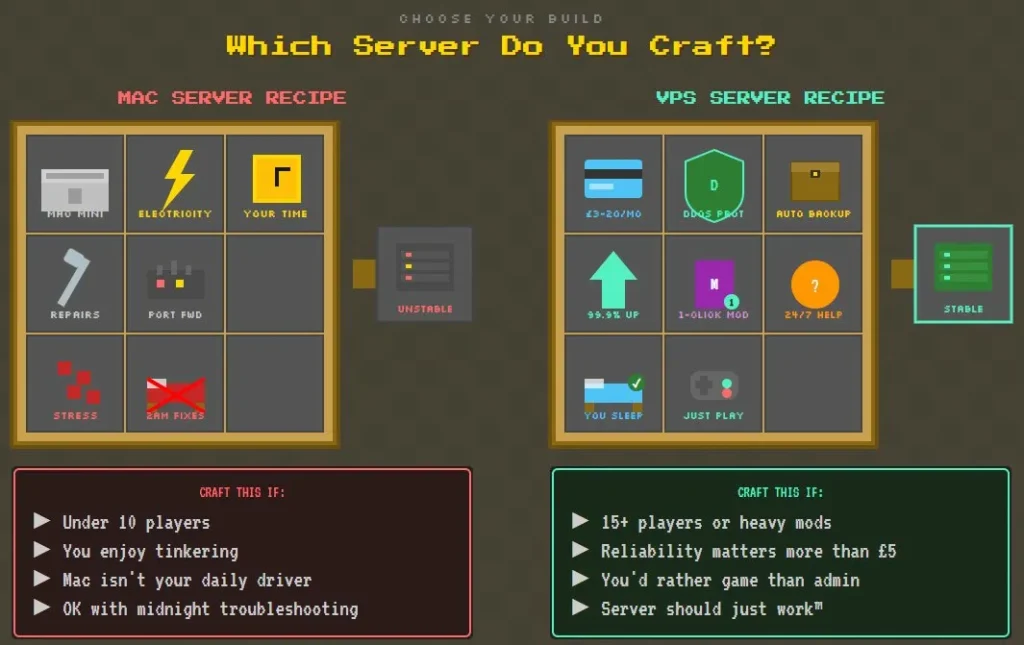
Run the Mac if:
- Your group is small, under 10 players
- You enjoy the technical side and don’t mind the maintenance
- You already own suitable hardware and it’s not your daily driver
- You’re comfortable with port forwarding, dynamic DNS, and midnight troubleshooting
Pay for VPS if:
- You want the server to just work without thinking about it
- Your group runs 15+ players or uses heavy mods
- Reliability matters more than saving £5 a month
- You’d rather spend your gaming time gaming, not administrating
Neither answer is wrong. The wrong answer is assuming the Mac option is free when it isn’t, or assuming VPS hosting is expensive when the mid-range tiers cost less than running your own hardware once you count everything.
The calm-server payoff
The best servers fade into the background. Players log in, build, explore, and forget the infrastructure exists.
Do a quick five-minute check before big sessions: everyone connects, chunks load smoothly, backups ran overnight. That little ritual keeps momentum high and stops small problems becoming server-killing disasters.
Whether you’re running a Mac Mini under your desk or renting a box from Shockbyte, the goal’s the same: a world that feels solid enough that people stop worrying about it and start building something worth keeping.
Electricity costs based on Ofgem price cap April-June 2026. VPS pricing checked February 2026 — deals change, verify before purchasing.


